
16 October 2026
Inside the MONA L05's Infotainment: XOS 6.3.0, Screen by Screen
A 59-minute single-take walkthrough of the XPeng MONA L05's XOS 6.3.0 infotainment has been published on Weibo: nine scene modes from camping to conveyor car-wash, a 14-point cloud-massage seat with an AI driver's seat that re-trims itself around your posture, a Dock of ten slots expandable to sixteen, VLA 2.0 Ultra on two Turing chips with parking-spot-to-parking-spot driving, and sentry clips stored in the head unit rather than on a USB drive. We go through the hour section by section.
The MONA L05 has been public for a fortnight, but almost all of it has been seen from the outside: the pre-sale date, the six colours, a set of interior slides each labelled "300,000-RMB-class equipment". What has been missing is the part an owner lives with every day — the screen.
On 17 October the Weibo reviewer 魅力少年马里昂 published a 59-minute, single-take walkthrough of a stationary L05 running XOS 6.3.0. The car in the video identifies itself as version 6.3.0, build 8901, "Ultra VLA 2.0". There is no driving and no lap time in it: it is one continuous pass through every menu in the car, in order, including the ones a press deck never shows.
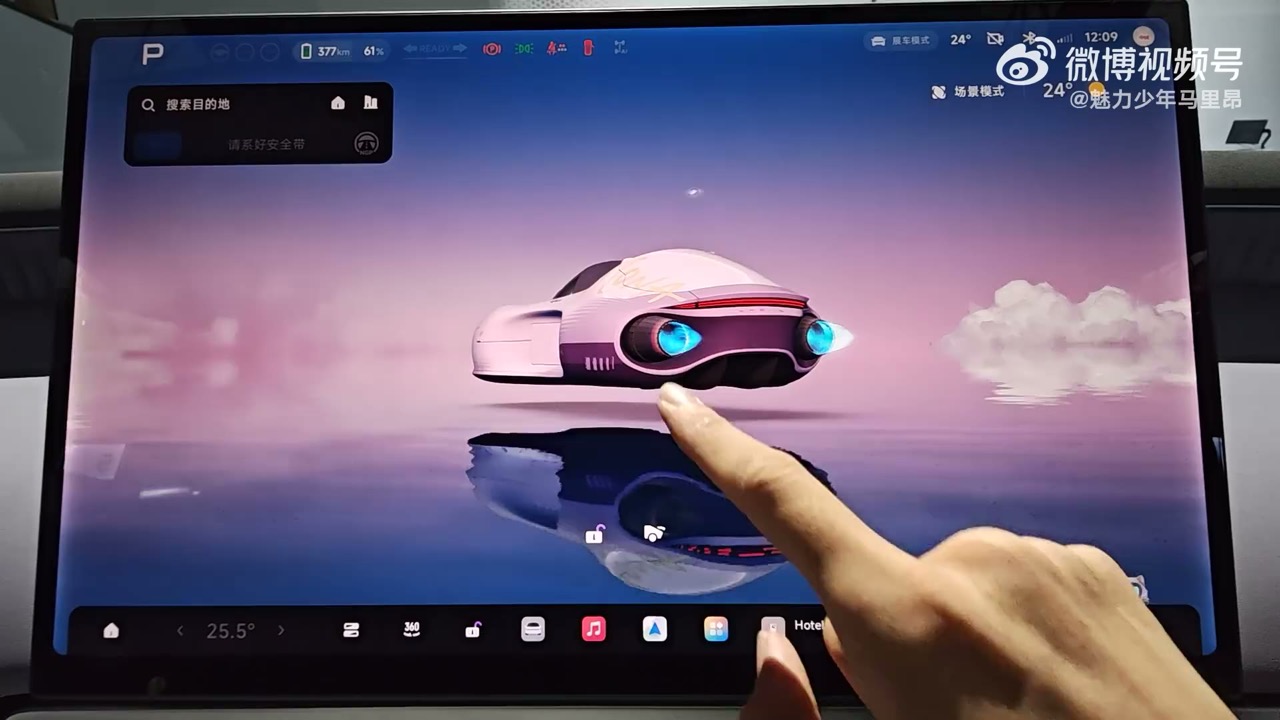
1. The home screen is a theme now — this one has a spaceship
The card-based home layout is back, and it is more configurable than the version it replaces. The map can take the whole screen, or share it: the SR (surround-reality) panel on one third and the map on the other two, in whichever orientation the driver prefers. Double-tapping the SR pane enlarges it.
The car in the video is what the host calls a "ROM kit" edition, and it carries an exclusive theme called 时光漫游 — "Time Travel." Instead of a 3D model of the car, the avatar is a small hovering spaceship with a red light bar and clouds drifting past. Switching themes plays a transition animation, and the theme is not cosmetic only: on the Time Travel theme the control page's trunk button does nothing visual, because the spaceship has no trunk lid to animate. Switch back to a car-shaped theme and the same button opens the trunk with a live animation, including the indicators flashing in time.
The navigation also inherits the theme — route text renders in purple — and the host notes a small interaction trap: with navigation active, the scene-mode shortcut disappears from the home screen. Exit the route and it comes back. The scene modes remain reachable from the app drawer, but the one-tap entry is navigation-dependent.
2. Fifteen ways to stop being a car: the scene-mode suite
The scene-mode page is the most distinctive thing in this car, and it is where the hour spends its first fifteen minutes. It is a list of states the cabin can be put into, each one a bundle of lighting, climate, seat, screen and locking behaviour rather than a single toggle.
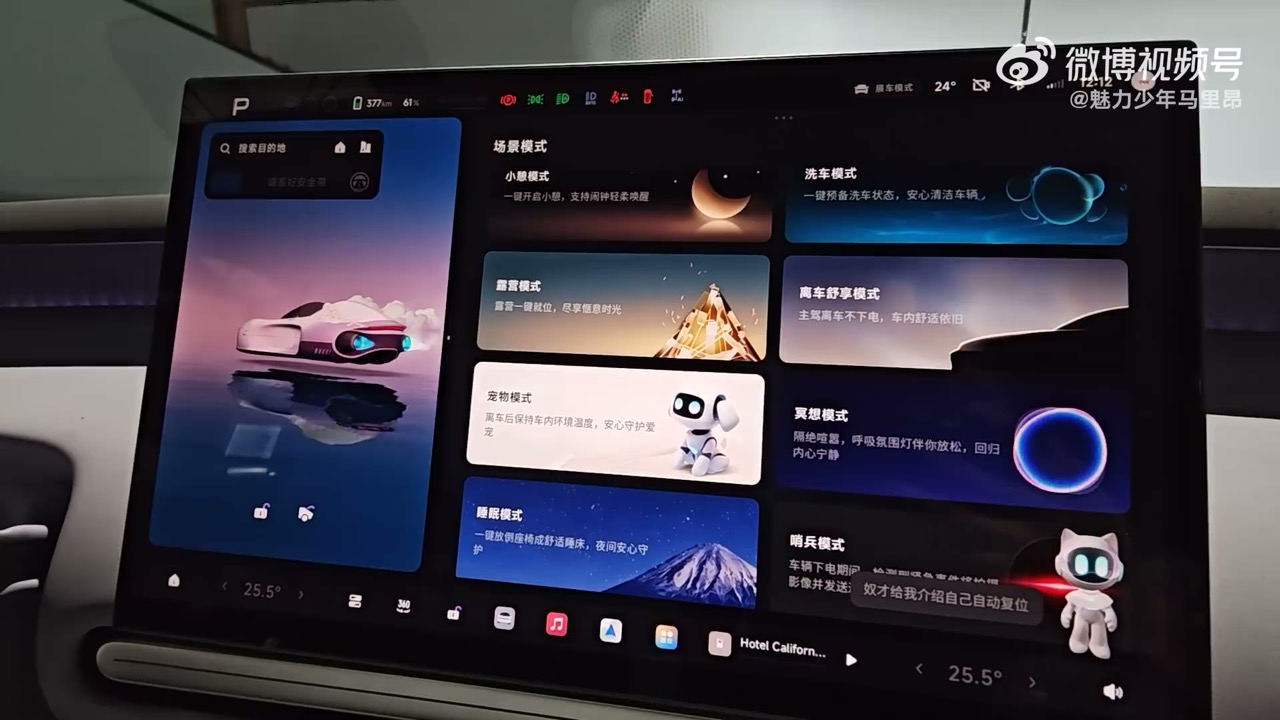
- Camping mode. Headlights, ambient lighting and reading lights off, screen dark, seats adjustable from the same page, and the option to run the car's V2L external discharge — the L05 can power a device from the car without an extra adapter. What the host singles out is the exit behaviour: leave camping mode and the seats automatically return to their driving positions, with no second step.
- Sleep mode goes further, with a sleep safety guard that keeps the vehicle powered and monitored, air-quality checks, an alarm, music and the "big bed" seat layouts demonstrated in an earlier video.
- Pet mode keeps the screen awake with the cabin temperature, a cartoon pet and a "the owner is coming back soon — don't worry" message so passers-by do not break a window; the air conditioning stays on, the doors stay locked, the rear entertainment screen switches off, and exiting takes a three-second long press.
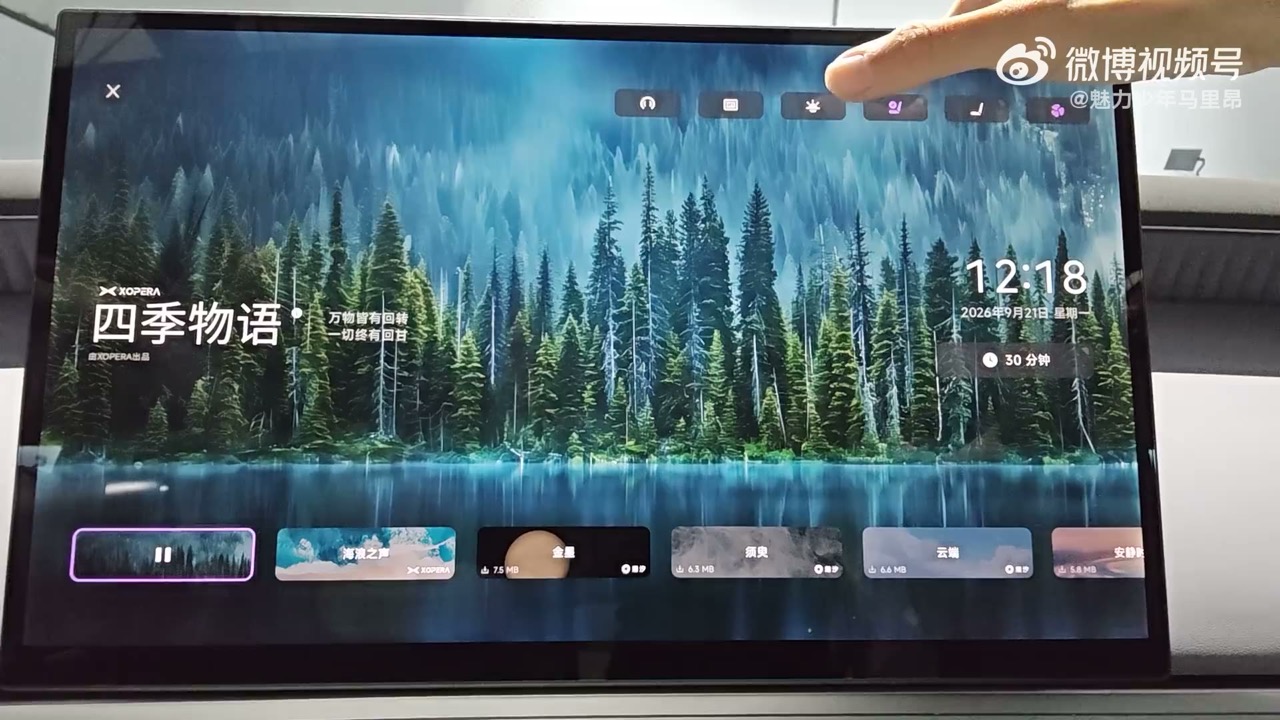
- Meditation mode moves the seat and cabin to a comfort preset and opens a small ecosystem: a smart headband that the car pairs with to collect EEG data, with an AI algorithm reading the wearer's brain state and feeding it back. The visual themes run from a forest scene ("四季物语", credited to KOPERA) to soundscapes including Sound of the Waves, Venus and Cloud, each with its own file size shown on the card.
- Nap, waiting, screen-cleaning, car-wash and comfort-while-away modes cover the smaller rituals. Waiting mode turns off the lights and the screen. Screen-cleaning mode blanks the display and needs a three-second press to leave. Car-wash mode disables the automatic wipers, the headlights, automatic unlocking, the door-handle buttons and the auto power-down, checks that the windows, doors and tailgate are shut, sets recirculation and retracts the handles — and it has a dedicated conveyor car wash path that shifts to N, releases and then folds the mirrors and asks the driver to hold the brake and confirm. The comfort-while-away mode (离车舒享) is the honest version of a familiar feature: the driver gets out and locks the door, and the air conditioning and entertainment keep running.
Sentry mode gets a section of its own later in the settings, and one detail is worth knowing before delivery: on the L05 the sentry clips are stored in the head unit, not on the dashcam's USB drive, so the function works even with no card fitted. The rules are stated on screen — when risk events exceed 30 GB, or total storage passes 90%, the oldest low-risk clips are overwritten in a loop while high-risk events are kept permanently. Events are pushed to the phone app and can be replayed in the car; what the system will not do is let an owner watch the cameras live, and the on-screen explanation is privacy: live remote viewing would require faces to be obscured. Sentry also suspends itself during an OTA, in service mode, at low battery, or if the app is used to unlock the car or open the trunk.
3. The seat has fourteen air bladders and a mind of its own
The climate and seat panel is where the L05 stops feeling like a value car. Front seats take three levels of heating and ventilation and a 14-point "cloud" massage with six programmes covering the shoulders, back and hips; the steering wheel and the rear seats get three-level heating of their own.
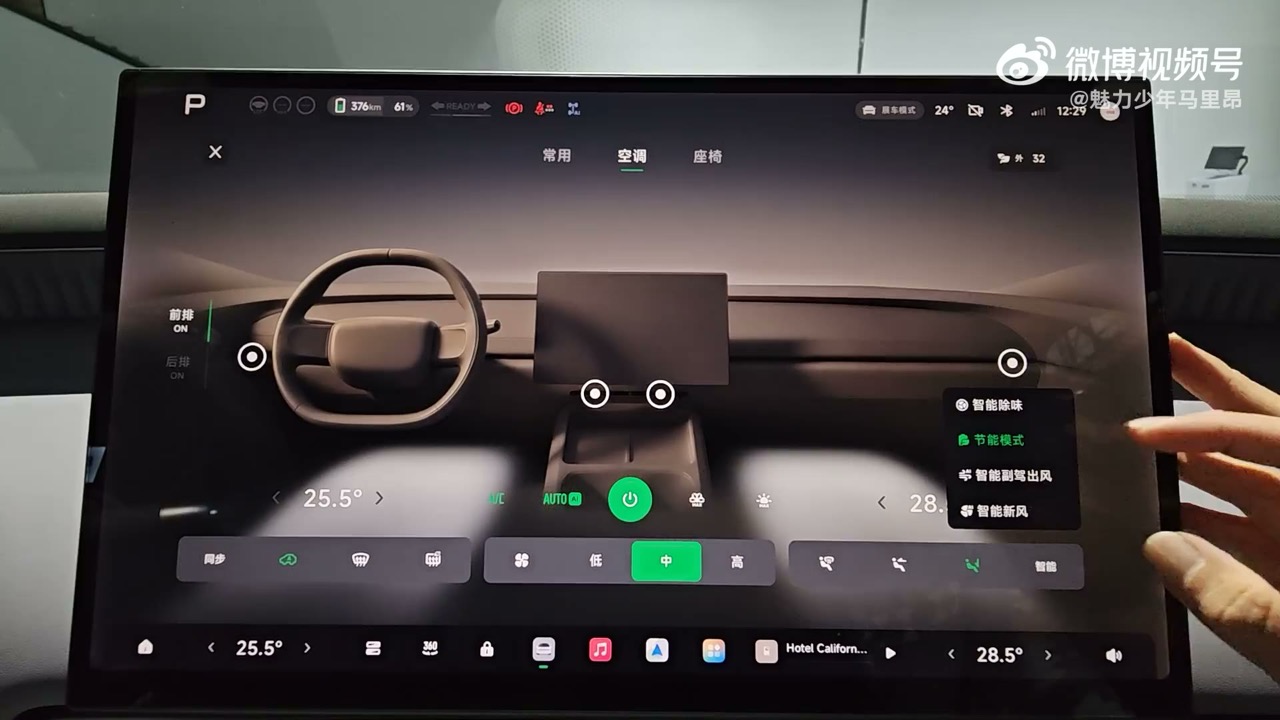
The driver's seat can also be an AI seat. Asked to adjust itself, it moves through the bolsters and cushion with a live animation showing which bladder is inflating, then keeps adapting: the host sits forward, reclines, and presses his back into the cushion, and each time the seat re-trims itself around the new posture "in real time."
Manual control is unusually deep, and it hides behind the left stalk. Toggling the stalk up and down cycles through shoulder, side bolster, lumbar and cushion; within each, the four-way switch does something different — front/back moves the shoulder, up/down moves the seat-cushion bolster while front/back moves the backrest bolster, the lumbar support inflates and deflates, and the cushion's up/down adjusts firmness (up is firmer, with the inflation visible on camera) while the cushion's front section both extends and rises. The host films the shoulder bladder and the backrest bolster from the side to show the travel, and measures the bolster sweep as noticeably large for the class.
4. A Dock you can rebuild, and a shortcut you can reprogram
Two customisation systems sit on top of each other. The bottom Dock ships with ten slots, but the climate widget occupies three of them — remove it and there are sixteen positions to fill from the full app list and a "common functions" pool: trunk, volume, door locks, the 360 control centre, seat heating/ventilation/massage, seat panel, climate, lighting, wipers, mirrors, emergency recording, the rear entertainment screen and the preview-camera button. One tap resets it to the factory arrangement of climate, music and volume on either side.
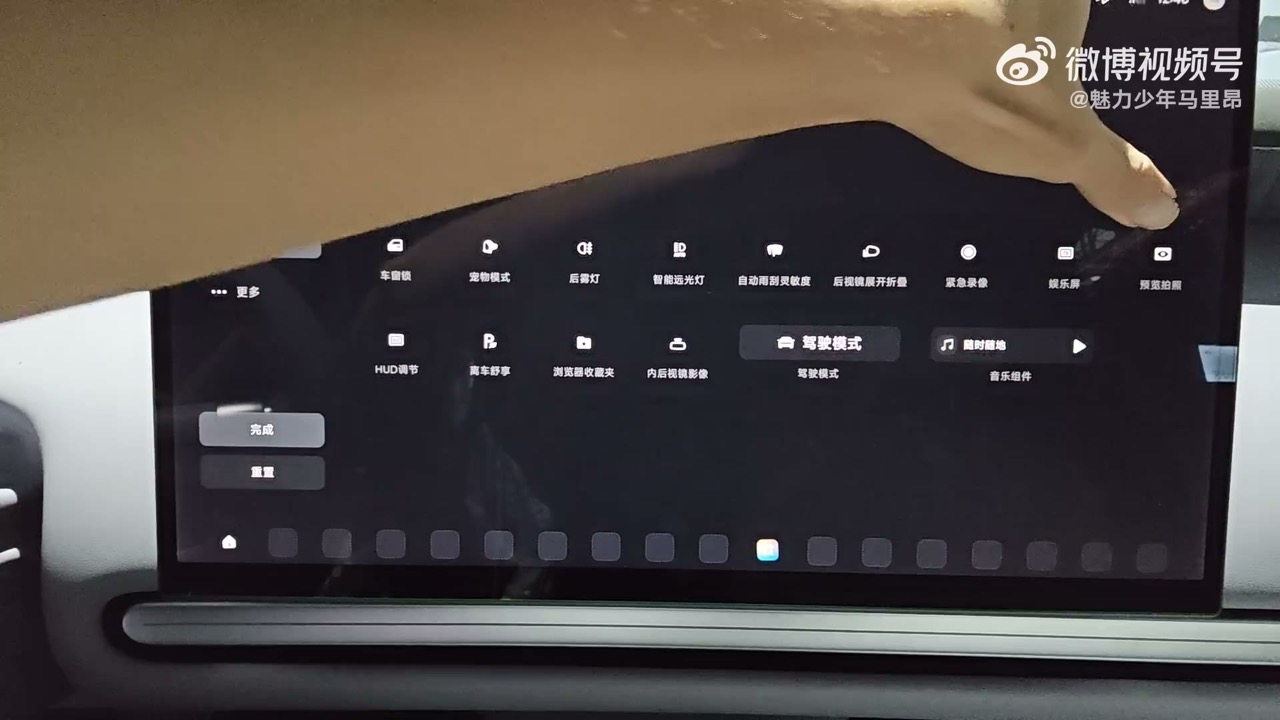
The driver-side shortcut column opens with a swipe and pairs a fixed top row — trunk, door lock, mirror fold and unfold, headlight adjustment — with ten editable slots below it, reordered or emptied in an edit mode.
The best find in this section is what those shortcut buttons can be bound to. The list includes the usual (wake or close voice, trunk, open and close the 360 view) and one genuinely useful addition: the interior rear-view camera view, so a tap brings the mirror camera up on the centre screen. The same button can also wake Siri, because the car now supports CarPlay — and Huawei HiCar — which the host acknowledges without much enthusiasm, since the built-in map is already good enough that he sees no reason to mirror a phone one.
5. VLA 2.0 Ultra, two Turing chips, and the settings that prove it
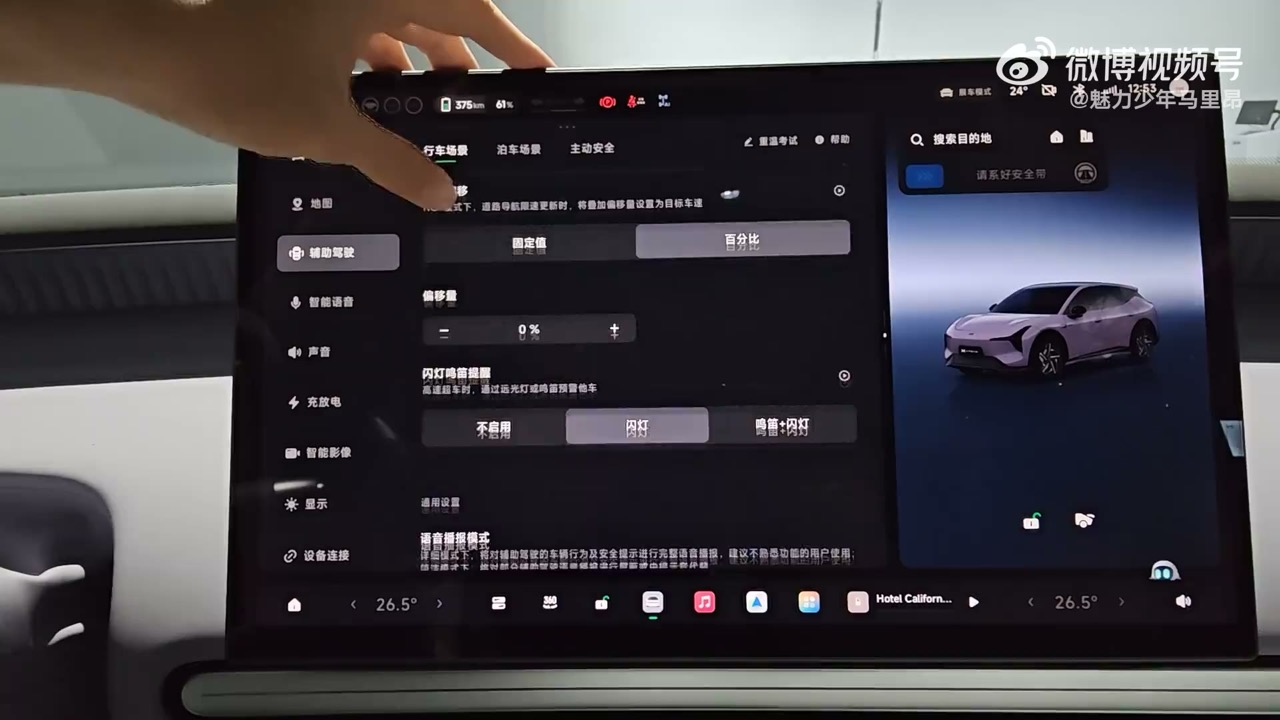
The assisted-driving page is short but specific. It lists VLA 2.0 with an Ultra version, two Turing chips and "full-scenario assisted driving," then offers: a co-driving mode, ETC-assisted passage, parking-spot-to-parking-spot driving (routes can be learned for a campus or car park, and NGP activates from the current spot and drives into the destination), an overtaking style that switches between conservative, standard and eager, a speed-limit offset set either in km/h or as a percentage, horn and headlight reminders for overtaking, a voice-broadcast detail level, and the blue indicator light that announces the car is driving itself — which can be switched off, if the owner would rather other drivers did not know.
Elsewhere in vehicle settings: Eco, Comfort, Sport and Individual drive modes with independent power response, steering weight, energy recovery and a smart chassis mode; a per-mode "restore default" that resets only the mode you are in, which the host demonstrates by watching Comfort's steering flip from heavy back to light. There are wet, snow and anti-motion-sickness modes (the last one only engages when parked), each with its own animation; comfort braking to cut brake dive; agile steering, which brakes and trims power at large low-speed steering angles for a 5.4 m minimum turning radius; hill-descent control; ESC defeat; and an ultimate power-saving mode.
6. The details an owner will notice in month two
The last third of the hour is a list of small things that are easy to get wrong and mostly are not here.
- The 360 view stays on at any speed if you want it to. By default it closes 35 seconds after the last input; disable that and it stops retreating.
- The turn-signal side-rear camera only works in D, not in the display state this showroom car was in — an old complaint in the comments, and the host points out the obvious consequence: if it will not demonstrate in a stationary car, a buyer never learns the feature exists.
- Narrow-road activation of the panoramic view has an adjustable sensitivity, and the camera view can switch between an all-wheels-plus-hub view and a panoramic one.
- The dashcam records to the USB drive and records no audio, locks the footage before and after an impact, and can record either the main view or a main-plus-surround combination.
- The exterior mirrors reverse-tilt left and right, fold on lock, and can unfold on unlock or on door-open. Their adjustment range is startling: at full inward travel the host can use the mirror as a shaving mirror, and at the outward limit he can see the rear wheel rim — the thing that keeps alloy wheels off kerbs.
- The HUD takes a standard or enlarged font, is moved by the steering-wheel buttons for angle and the wheel for height and brightness, and offers map, perception and minimal display modes, with a yellow palette in snow mode. Turn-signal side-rear images and the reversing camera can both be shown in it.
- The cabin camera is an OMS unit that watches for people and pets left behind, takes photos with a fill light, and files them in a "cabin footage" album. Getting one to a phone is done by QR code over a hotspot rather than through the cloud — and the voice assistant flatly refuses to take a photo, which the host tests four times.
- Storage and language. The general page reports software 6.3.0 and build 8901, and storage at 18% used. Clearing a 3.8 GB cache drops that to 13%, from which the host does the arithmetic on camera: 5% ≈ 3.8 GB, so the module is roughly 76 GB of usable space in a 128 GB part. The language list contains Simplified Chinese and English and nothing else.
- Smart scenarios are rule-based automation, presented as a small visual programming page: parked, driver unbuckled, in P, above about 150 km of range, and sentry mode arms itself. The host tries to write his own condition and finds the trigger list is fixed.
- Games and apps. There is a game centre with cloud and in-car games, and an app store with wireless and wired screen mirroring, music and audiobooks, Meituan, education apps, and XPeng's own IoT add-ons.
What the hour does not answer
It is a showroom car on a stationary day, so nothing here says anything about how the L05 drives, how VLA 2.0 Ultra behaves in traffic, or what the charging curve looks like. Two smaller gaps are worth flagging: the shortcut-settings screen carries a reference to the MONA M03 rather than the L05, which suggests shared UI code between the two — and the "ROM kit" theme the video spends its first minutes admiring may be an edition-specific trim rather than a standard one. Both are questions for the configurator, not for the video.
What the video does establish is the shape of the product. The L05's infotainment is not a cheaper version of the G-series cabin; it is a differently organised one, built around state-based scene modes, deep seat hardware and a Dock the owner assembles themselves. Whether that is worth more than a bigger screen is the sort of thing that a two-week-old pre-sale order book will decide.
Source: 魅力少年马里昂 (Weibo) — translated & adapted for XPENGTech.
Get the next one direct.
New articles, or a daily / weekly digest — the same list EVConduit keeps.